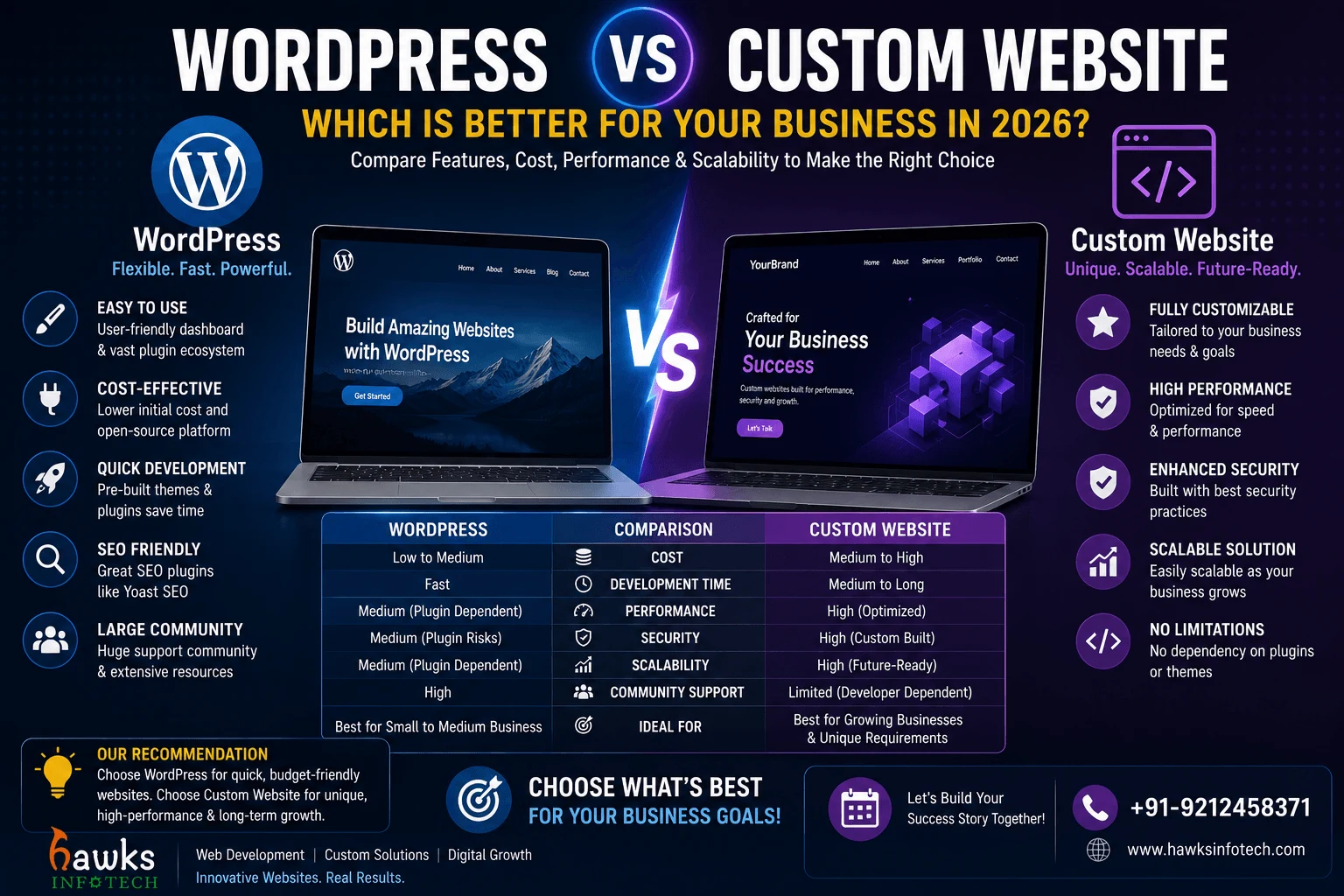
Choosing the right technology foundation for your business website is one of the most critical digital decisions you will make. Pick the wrong platform, and you risk getting trapped in endless plugin conflicts, crippling website slowdowns, constant malware vulnerabilities, or exorbitant development costs that drain your marketing budget.
Target Audience
This strategic decision guide is crafted for business owners, startup founders, marketing heads, and enterprise decision-makers evaluating whether to build their next website on WordPress or invest in custom web development.
What You Will Learn
You will explore an unbiased evaluation of both platforms: initial development costs vs. long-term total cost of ownership, loading speed and Core Web Vitals benchmarks, cybersecurity and plugin vulnerability management, and scalability limits.
Supporting Deep-Dive Guide
Pillar Parent: Website Development Trends in 2026: Modern Web Standards
Quick Answer & Key Strategic Takeaway
Choose WordPress if you need a rapid, budget-friendly website (under ₹30,000) with a standard blog or catalog that non-technical staff can update daily without coding. Choose a Custom Website if you require blazing-fast sub-second loading speeds, unique custom business workflows, enterprise-grade security with zero plugin vulnerabilities, and unlimited long-term scalability.
Table of Contents
1. Understanding the Two Development Philosophies
WordPress is an open-source Content Management System (CMS) that powers over 40% of the web. It relies on a pre-built PHP core, themes, and a vast ecosystem of third-party plugins to add functionality like SEO, contact forms, e-commerce, and security.
A Custom Website is engineered from the ground up using modern clean code (such as custom PHP/Laravel, React, Node.js, and Tailwind CSS) tailored specifically to your exact business requirements, without unnecessary third-party plugins or bloated template code.
Both platforms have strong merits in 2026, but they serve fundamentally different business models, budget tiers, and technical objectives.
2. Why Platform Choice Dictates Your Business Growth in 2026
In 2026, website speed and security are directly tied to revenue. WordPress sites that accumulate 30+ plugins suffer from severe database bloat and slow server response times, hurting Google rankings and driving away mobile visitors.
Over 90% of all CMS security vulnerabilities originate from outdated third-party WordPress plugins and themes, requiring constant weekly updates and security monitoring to prevent database injection and malware defacement.
Selecting the platform that aligns with your operational capabilities, security compliance standards, and growth goals prevents costly complete website rebuilds down the road.
3. 5 Key Criteria to Choose Between WordPress and Custom Development
To execute this strategy with maximum efficiency, implement the following prioritized step-by-step framework:
Criterion 1: Budget and Initial Timeline
WordPress allows for rapid turnaround (1 to 2 weeks) and lower initial investment. Custom development requires 3 to 6 weeks of dedicated architectural engineering and UI/UX design, representing a higher upfront investment but lower recurring plugin license costs.
Criterion 2: Speed and Core Web Vitals Performance
Custom-coded websites consistently achieve 95-100 scores on Google PageSpeed Insights because they execute only the exact code needed. WordPress requires extensive optimization (caching, database indexing, asset minification) to achieve comparable speed scores.
Criterion 3: Cybersecurity and Maintenance Overhead
Custom websites have virtually zero third-party plugin attack surface, making them extraordinarily secure. WordPress sites require continuous weekly maintenance, plugin updates, and security firewalls to protect against automated bot exploits.
Criterion 4: Unique Functionality and Business Logic
If your business requires custom customer portals, proprietary calculation tools, complex multi-tier booking algorithms, or bespoke API integrations, custom development delivers clean, scalable architecture without plugin limitations.
Criterion 5: Content Management and Non-Technical Editing
WordPress provides an intuitive visual editor (Gutenberg) that allows marketing teams to publish blog posts and landing pages without developer assistance. Custom websites can be paired with lightweight custom admin dashboards to provide equal ease of editing.
4. The 'Plugin Debt' Trap in WordPress
Deep-dive technical execution requires understanding real-world operational variables. Below is an authentic implementation scenario illustrating the measurable impact of this methodology:
Practical Example: The Maintenance Reality of 40-Plugin WordPress Sites
A corporate consulting agency in Gurgaon launched a WordPress site using a commercial theme. Over 2 years, they added plugins for forms, SEO, popups, multilingual translation, security, and sliders—reaching 38 active plugins. A major PHP update caused 4 incompatible plugins to crash the entire site, resulting in 3 days of downtime and an expensive emergency recovery bill. Rebuilding the core functionality into a streamlined custom PHP framework eliminated 34 plugins and increased site speed by 400%.
5. When WordPress Is the Undisputed Best Choice
Scalable execution requires addressing workflow edge-cases and optimization trade-offs:
Practical Example: Content Publishers and Local Service Catalogs
For a regional law firm in Delhi that publishes 5 articles weekly and needs standard service overview pages, a professionally developed custom WordPress theme—built without heavy page builders—provides the ideal balance of fast content publishing, excellent SEO, and cost-effective management.
6. Common Mistakes to Avoid in 2026
Organizations frequently undermine their performance by committing critical tactical errors. Guard against these costly pitfalls:
Mistake 1: Using heavy visual page builders (Elementor/Divi) on shared hosting without server-side caching (causes 5-second load times).
Mistake 2: Buying pirated or 'nulled' premium WordPress plugins (contains hidden cryptocurrency miners and backdoors).
Mistake 3: Building a custom website with non-standard proprietary code that no other developer can maintain.
Mistake 4: Failing to implement automated daily off-site backups regardless of the platform chosen.
Mistake 5: Choosing custom development for a simple 4-page brochure website where a standard CMS would suffice.
7. Action Plan & Technical Checklist
Use this structured comparison and audit matrix to benchmark your operational readiness:
| Comparison Factor | WordPress (CMS) | Custom-Coded Website (PHP / React / Laravel) |
|---|---|---|
| Initial Development Cost | ₹15,000 - ₹45,000 (Cost-Effective) | ₹35,000 - ₹1,50,000+ (Higher Initial Investment) |
| Development Timeline | 1 to 2 Weeks (Rapid Launch) | 3 to 6 Weeks (Architectural Build) |
| Loading Speed & Performance | Moderate (Requires caching & optimization) | Blazing Fast (Sub-500ms out-of-the-box) |
| Security Vulnerabilities | High (Targeted by automated plugin exploits) | Extremely High (Minimal third-party attack surface) |
| Long-Term Maintenance | Requires weekly plugin/core updates | Minimal (Zero plugin dependencies to break) |
| Custom Business Logic | Restricted by plugin capabilities | 100% Unlimited Custom Flexibility |
8. Frequently Asked Questions
Can a WordPress website achieve a 90+ Google PageSpeed score?
Yes! By using a clean custom-coded theme, avoiding heavy page builders, optimizing images in WebP format, using Redis object caching, and hosting on high-performance LiteSpeed or Nginx servers, WordPress can achieve top-tier performance scores.
Is a custom website harder to update than WordPress?
Not when paired with a custom administrative dashboard. Hawks Infotech builds intuitive, bespoke admin panels that allow non-technical staff to easily update text, images, blogs, and services with zero coding knowledge.
Which platform is better for SEO: WordPress or Custom?
Search engines do not rank websites based on the CMS used; they evaluate HTML structure, loading speed, mobile usability, and content quality. Custom websites have an advantage in speed and clean semantic markup, while WordPress makes on-page meta tag management simple.
Can I migrate from WordPress to a Custom Website later?
Yes. You can seamlessly export your blog posts, customer databases, and media assets from WordPress into a custom database architecture while setting up 301 redirects to preserve 100% of your search engine rankings.
9. Website Development & Engineering Topic Cluster
Explore the complete interconnected network of pillar guides and specialized deep-dive articles in this domain:

Website Development Trends in 2026: Modern Web Standards
Explore the comprehensive master guide that unifies all Website Development & Engineering strategies.
Website Development Trends in 2026: Modern Web Standards

How to Build an SEO-Friendly Website from Day One
10. Strategic Conclusion
The choice between WordPress and a Custom Website ultimately depends on your budget, speed requirements, and long-term business model. Whether you choose a streamlined, secure custom WordPress platform or a high-performance bespoke web application, Hawks Infotech delivers the architectural engineering and SEO foundation required to drive sustainable digital growth.
Ready to Upgrade Your WordPress & Custom Web Engineering?
Partner with Hawks Infotech's senior technology specialists and digital marketing architects to transform your business into an industry benchmark.